×
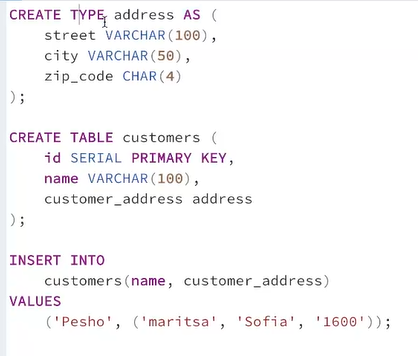
Custom type in SQL
×
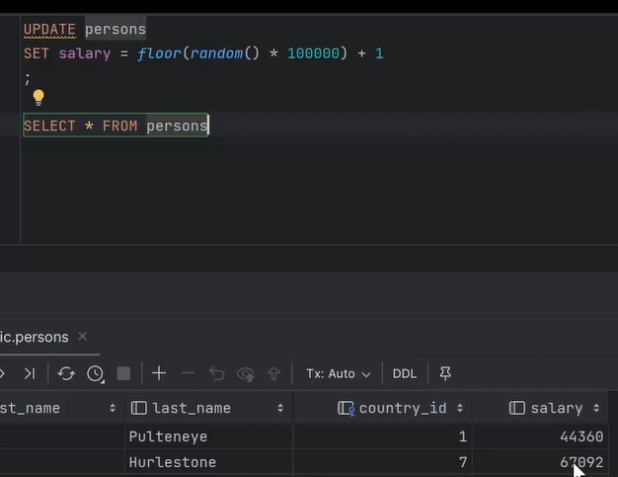
RANDOM()
RANDOM() generates a pseudo-random floating-point number
0.0 ≤ RANDOM() < 1.0 0.0≤RANDOM()<1.0
SELECT RANDOM();
# Might output: 0.374829
Multiplying RANDOM() by a number scales it
0.0≤RANDOM() * 100<100.0
SELECT RANDOM() * 100;
# Might output: 37.4829
random integer between 0 and 99:
SELECT FLOOR(RANDOM() * 100);
To get between 1 and 100:
SELECT FLOOR(RANDOM() * 100) + 1;
Random row selection:
SELECT *
FROM users
ORDER BY RANDOM()
LIMIT 5;
Picks 5 random rows from users.
RANDOM() → 0 ≤ x < 1
RANDOM() * N → scales to 0 ≤ x < N
FLOOR(RANDOM() * N) → integer 0..(N-1)
FLOOR(RANDOM() * N) + 1 → integer 1..N
0.0 ≤ RANDOM() < 1.0 0.0≤RANDOM()<1.0
SELECT RANDOM();
# Might output: 0.374829
Multiplying RANDOM() by a number scales it
0.0≤RANDOM() * 100<100.0
SELECT RANDOM() * 100;
# Might output: 37.4829
random integer between 0 and 99:
SELECT FLOOR(RANDOM() * 100);
To get between 1 and 100:
SELECT FLOOR(RANDOM() * 100) + 1;
Random row selection:
SELECT *
FROM users
ORDER BY RANDOM()
LIMIT 5;
Picks 5 random rows from users.
RANDOM() → 0 ≤ x < 1
RANDOM() * N → scales to 0 ≤ x < N
FLOOR(RANDOM() * N) → integer 0..(N-1)
FLOOR(RANDOM() * N) + 1 → integer 1..N
×
POSITION()
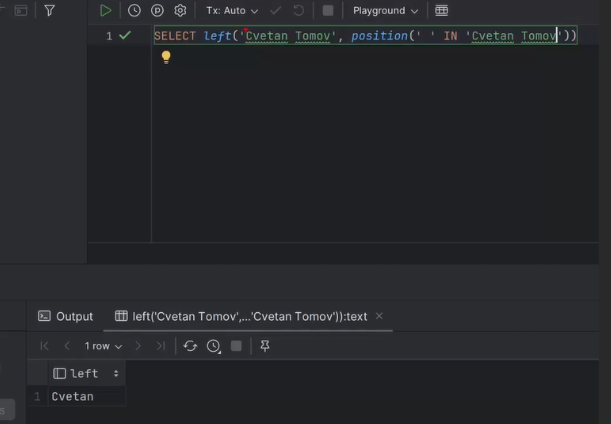
POSITION() finds the starting position of a substring within a string. It returns an integer indicating the 1-based index of the first occurrence, or 0 if the substring is not found.
POSITION(substring IN string)
SELECT POSITION('SQL' IN 'PostgreSQL'); -- 9
SELECT POSITION('Post' IN 'PostgreSQL'); -- 1
SELECT POSITION('x' IN 'PostgreSQL'); -- 0 (not found)
POSITION(substring IN string)
SELECT POSITION('SQL' IN 'PostgreSQL'); -- 9
SELECT POSITION('Post' IN 'PostgreSQL'); -- 1
SELECT POSITION('x' IN 'PostgreSQL'); -- 0 (not found)
×

GROUP BY
GROUP BY is used to aggregate data. It takes a table with many rows and groups them into “buckets” based on one or more columns. Then you can apply aggregate functions (COUNT, SUM, AVG, etc.) to each group.
SELECT
LEFT(first_name, 2) AS initials,
COUNT(*) AS user_count
FROM users
GROUP BY initials
GROUP BY initials tells SQL to group all rows by the first two letters of first_name.
Within each group, COUNT(*) counts how many users are in that group.
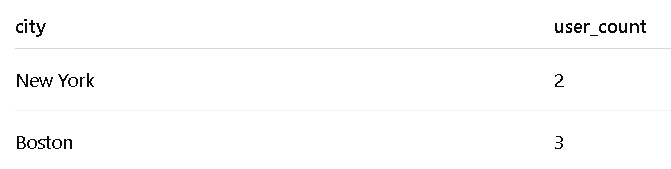
SELECT city, COUNT(*) AS user_count
FROM users
GROUP BY city;
SELECT
LEFT(first_name, 2) AS initials,
COUNT(*) AS user_count
FROM users
GROUP BY initials
GROUP BY initials tells SQL to group all rows by the first two letters of first_name.
Within each group, COUNT(*) counts how many users are in that group.
SELECT city, COUNT(*) AS user_count
FROM users
GROUP BY city;
SQL looked at the city column.
Made one group for each unique city.
Counted how many rows were in each group using COUNT(*).
COUNT(*) → counts all rows in the group, including duplicates and NULLs.
COUNT(column_name) → counts only rows where the column is not NULL.
SELECT city,
COUNT(*) AS total_users,
AVG(age) AS avg_age,
MIN(age) AS youngest,
MAX(age) AS oldest
FROM users
GROUP BY city;
Made one group for each unique city.
Counted how many rows were in each group using COUNT(*).
COUNT(*) → counts all rows in the group, including duplicates and NULLs.
COUNT(column_name) → counts only rows where the column is not NULL.
SELECT city,
COUNT(*) AS total_users,
AVG(age) AS avg_age,
MIN(age) AS youngest,
MAX(age) AS oldest
FROM users
GROUP BY city;
>>
count(distinct) returns the count of groups
count(*) returns the count of rows
count(distinct) returns the count of groups
count(*) returns the count of rows
×
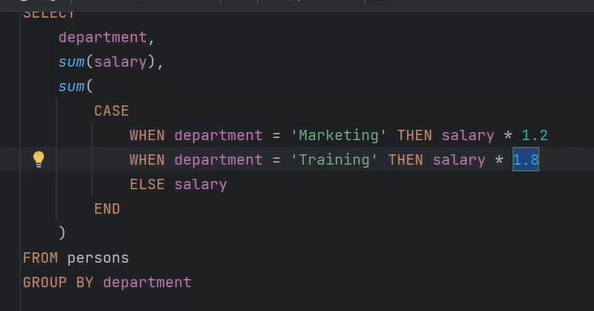
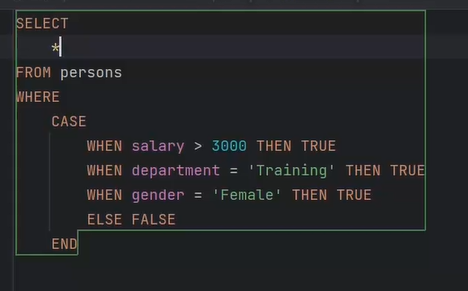
CASE
CASE
WHEN condition1 THEN result1
WHEN condition2 THEN result2
ELSE result_default
END
SELECT
e.id,
e.first_name,
e.last_name,
CAST(e.salary AS DECIMAL(18,2)),
e.department_id,
CASE
WHEN d.name NOT IN ('Management', 'Kitchen Staff', 'Service Staff')
THEN 'Other'
ELSE d.name
END AS department_name
FROM employees as e
JOIN departments as d
ON e.department_id = d.id
WHEN condition1 THEN result1
WHEN condition2 THEN result2
ELSE result_default
END
SELECT
e.id,
e.first_name,
e.last_name,
CAST(e.salary AS DECIMAL(18,2)),
e.department_id,
CASE
WHEN d.name NOT IN ('Management', 'Kitchen Staff', 'Service Staff')
THEN 'Other'
ELSE d.name
END AS department_name
FROM employees as e
JOIN departments as d
ON e.department_id = d.id
>>
CASE department_id
WHEN 1 THEN salary*1.15
WHEN 2 THEN salary*1.10
ELSE salary*1.05
END
CASE department_id
WHEN 1 THEN salary*1.15
WHEN 2 THEN salary*1.10
ELSE salary*1.05
END
>>
UPDATE employees
SET
salary = CASE
WHEN hire_date < '2015-01-16' THEN salary + 2500
WHEN hire_date < '2020-03-04' THEN salary + 1500
ELSE salary
END,
job_title = CASE
WHEN hire_date < '2015-01-16' THEN CONCAT('Senior ', job_title)
WHEN hire_date < '2020-03-04' THEN CONCAT('Mid-', job_title)
ELSE job_title
END;
UPDATE employees
SET
salary = CASE
WHEN hire_date < '2015-01-16' THEN salary + 2500
WHEN hire_date < '2020-03-04' THEN salary + 1500
ELSE salary
END,
job_title = CASE
WHEN hire_date < '2015-01-16' THEN CONCAT('Senior ', job_title)
WHEN hire_date < '2020-03-04' THEN CONCAT('Mid-', job_title)
ELSE job_title
END;
>>
Nested:
SELECT "first_name", "last_name", "job_title", "salary", "department_id",
CASE
WHEN salary >= 25000 THEN
CASE
WHEN job_title LIKE 'Senior%' THEN 'High-performing Senior'
ELSE 'High-performing Employee'
END
ELSE 'Average-performing'
END AS performance_rating
FROM "employees"
Nested:
SELECT "first_name", "last_name", "job_title", "salary", "department_id",
CASE
WHEN salary >= 25000 THEN
CASE
WHEN job_title LIKE 'Senior%' THEN 'High-performing Senior'
ELSE 'High-performing Employee'
END
ELSE 'Average-performing'
END AS performance_rating
FROM "employees"
>>
SELECT
SUM(CASE WHEN department_id = 1 THEN 1 ELSE 0 END) AS "Engineering",
SUM(CASE WHEN department_id = 2 THEN 1 ELSE 0 END) AS "Tool Design",
SUM(CASE WHEN department_id = 3 THEN 1 ELSE 0 END) AS "Sales",
SUM(CASE WHEN department_id = 4 THEN 1 ELSE 0 END) AS "Marketing",
SUM(CASE WHEN department_id = 5 THEN 1 ELSE 0 END) AS "Purchasing",
SUM(CASE WHEN department_id = 6 THEN 1 ELSE 0 END) AS "Research and Development",
SUM(CASE WHEN department_id = 7 THEN 1 ELSE 0 END) AS "Production"
FROM employees;
SET
salary = CASE
WHEN hire_date < '2015-01-16' THEN salary + 2500
WHEN hire_date < '2020-03-04' THEN salary + 1500
ELSE salary
END,
job_title = CASE
WHEN hire_date < '2015-01-16' THEN CONCAT('Senior ', job_title)
WHEN hire_date < '2020-03-04' THEN CONCAT('Mid-', job_title)
ELSE job_title
END;
SELECT
SUM(CASE WHEN department_id = 1 THEN 1 ELSE 0 END) AS "Engineering",
SUM(CASE WHEN department_id = 2 THEN 1 ELSE 0 END) AS "Tool Design",
SUM(CASE WHEN department_id = 3 THEN 1 ELSE 0 END) AS "Sales",
SUM(CASE WHEN department_id = 4 THEN 1 ELSE 0 END) AS "Marketing",
SUM(CASE WHEN department_id = 5 THEN 1 ELSE 0 END) AS "Purchasing",
SUM(CASE WHEN department_id = 6 THEN 1 ELSE 0 END) AS "Research and Development",
SUM(CASE WHEN department_id = 7 THEN 1 ELSE 0 END) AS "Production"
FROM employees;
SET
salary = CASE
WHEN hire_date < '2015-01-16' THEN salary + 2500
WHEN hire_date < '2020-03-04' THEN salary + 1500
ELSE salary
END,
job_title = CASE
WHEN hire_date < '2015-01-16' THEN CONCAT('Senior ', job_title)
WHEN hire_date < '2020-03-04' THEN CONCAT('Mid-', job_title)
ELSE job_title
END;
×
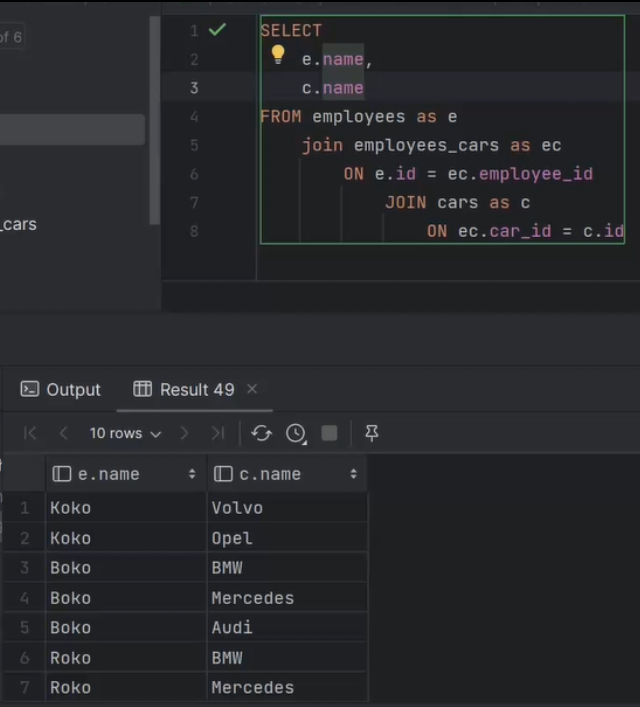
JOIN
1. INNER JOIN
Returns only the rows that match in both tables.
If there’s no match, the row is not included.
SELECT students.id, students.student_name, exams.exam_name
FROM students
INNER JOIN exams
ON students.id = exams.id;
Here, only students who have matching id in exams will appear.
2. LEFT JOIN (or LEFT OUTER JOIN)
Returns all rows from the left table (first table), and the matching rows from the right table.
If there’s no match in the right table, you get NULL for the right table’s columns.
SELECT students.student_name, exams.exam_name
FROM students
LEFT JOIN exams
ON students.id = exams.id;
All students appear. If a student has no exam, exam_name will be NULL.
3. RIGHT JOIN (or RIGHT OUTER JOIN)
Opposite of LEFT JOIN: returns all rows from the right table, and matching rows from the left table.
If there’s no match in the left table, you get NULL for the left table’s columns.
4. FULL JOIN (or FULL OUTER JOIN)
Returns all rows from both tables, with NULL where there’s no match.
5. CROSS JOIN
Returns every combination of rows from the two tables.
If Table A has 3 rows and Table B has 4 rows, the result has 3 × 4 = 12 rows.
Returns only the rows that match in both tables.
If there’s no match, the row is not included.
SELECT students.id, students.student_name, exams.exam_name
FROM students
INNER JOIN exams
ON students.id = exams.id;
Here, only students who have matching id in exams will appear.
2. LEFT JOIN (or LEFT OUTER JOIN)
Returns all rows from the left table (first table), and the matching rows from the right table.
If there’s no match in the right table, you get NULL for the right table’s columns.
SELECT students.student_name, exams.exam_name
FROM students
LEFT JOIN exams
ON students.id = exams.id;
All students appear. If a student has no exam, exam_name will be NULL.
3. RIGHT JOIN (or RIGHT OUTER JOIN)
Opposite of LEFT JOIN: returns all rows from the right table, and matching rows from the left table.
If there’s no match in the left table, you get NULL for the left table’s columns.
4. FULL JOIN (or FULL OUTER JOIN)
Returns all rows from both tables, with NULL where there’s no match.
5. CROSS JOIN
Returns every combination of rows from the two tables.
If Table A has 3 rows and Table B has 4 rows, the result has 3 × 4 = 12 rows.
>>>
JOIN customers AS c
USING customer_id -> WRONG
JOIN customers AS c
USING (customer_id) -> RIGHT
JOIN customers AS c
USING customer_id -> WRONG
JOIN customers AS c
USING (customer_id) -> RIGHT
×
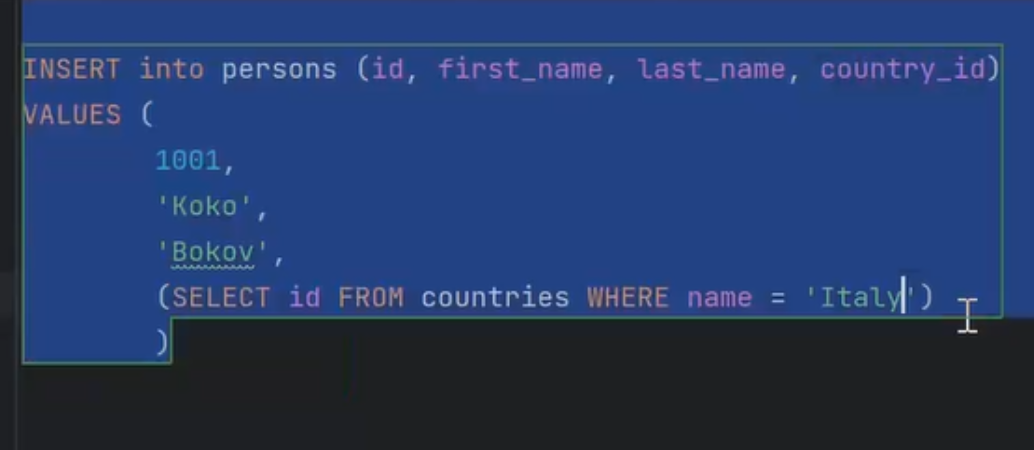
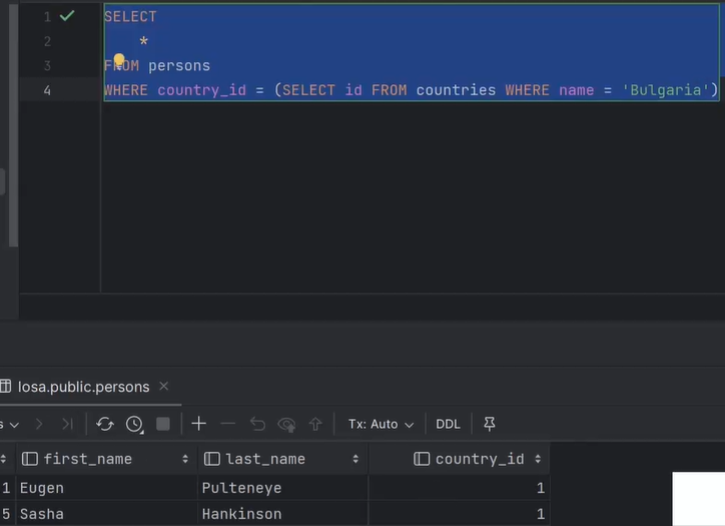
subqueries
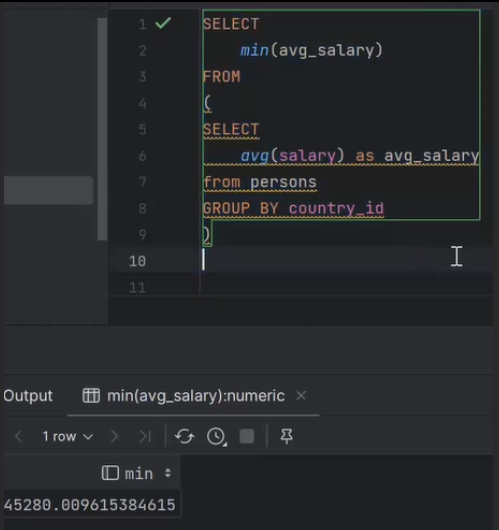
SELECT
MIN(average) AS min_average_area
FROM (
SELECT
AVG(area_in_sq_km) AS average
FROM countries
GROUP BY continent_code ) AS average_area
The alieses are mandatory in older versions.
Inner query → calculates average area per continent.
Outer query → finds the minimum among these averages.
Use of subquery is necessary because you need to aggregate twice:
First by continent (AVG)
Then across all continents (MIN)
>>>
UPDATE monasteries
SET three_rivers = TRUE
WHERE country_code IN (
SELECT country_code AS CC
from countries
LEFT JOIN countries_rivers
USING (country_code)
LEFT JOIN rivers
ON rivers.id = countries_rivers.river_id
GROUP BY country_code
HAVING COUNT(rivers.river_name) >= 3)
The outer UPDATE checks monasteries.country_code against the subquery.
For any monastery in a country with 3+ rivers, three_rivers is set to TRUE
>>>
UPDATE countries
SET three_rivers = (
SELECT COUNT(*) >= 3
FROM countries_rivers AS cr
WHERE cr.country_code = countries.country_code
);
For each row in countries, the subquery:
Counts how many rows exist in countries_rivers for that country.
Evaluates COUNT(*) >= 3 → returns true or false.
That boolean value is assigned to countries.three_rivers.
No grouping needed — it’s evaluated per row (correlated subquery).
three_rivers = FALSE -> Does not match null, only rows that are explicitly FALSE
three_rivers IS FALSE -> Does not match null, only rows that are explicitly FALSE
three_rivers IS NOT TRUE -> Does match null
NOT tree_rivers -> Does match null
MIN(average) AS min_average_area
FROM (
SELECT
AVG(area_in_sq_km) AS average
FROM countries
GROUP BY continent_code ) AS average_area
The alieses are mandatory in older versions.
Inner query → calculates average area per continent.
Outer query → finds the minimum among these averages.
Use of subquery is necessary because you need to aggregate twice:
First by continent (AVG)
Then across all continents (MIN)
>>>
UPDATE monasteries
SET three_rivers = TRUE
WHERE country_code IN (
SELECT country_code AS CC
from countries
LEFT JOIN countries_rivers
USING (country_code)
LEFT JOIN rivers
ON rivers.id = countries_rivers.river_id
GROUP BY country_code
HAVING COUNT(rivers.river_name) >= 3)
The outer UPDATE checks monasteries.country_code against the subquery.
For any monastery in a country with 3+ rivers, three_rivers is set to TRUE
>>>
UPDATE countries
SET three_rivers = (
SELECT COUNT(*) >= 3
FROM countries_rivers AS cr
WHERE cr.country_code = countries.country_code
);
For each row in countries, the subquery:
Counts how many rows exist in countries_rivers for that country.
Evaluates COUNT(*) >= 3 → returns true or false.
That boolean value is assigned to countries.three_rivers.
No grouping needed — it’s evaluated per row (correlated subquery).
three_rivers = FALSE -> Does not match null, only rows that are explicitly FALSE
three_rivers IS FALSE -> Does not match null, only rows that are explicitly FALSE
three_rivers IS NOT TRUE -> Does match null
NOT tree_rivers -> Does match null
>>
CREATE VIEW
continent_currency_usage
AS
SELECT
ra.continent_code,
ra.currency_code,
ra.currency_usage
FROM (
SELECT
ct.continent_code,
ct.currency_code,
ct.currency_usage,
DENSE_RANK() OVER (PARTITION BY ct.continent_code ORDER BY ct.currency_usage DESC) AS ranked_usage
FROM (
SELECT
continent_code,
currency_code,
COUNT(currency_code) AS currency_usage
FROM
countries
GROUP BY
continent_code,
currency_code
HAVING
COUNT(currency_code) > 1
) AS ct
) AS ra
WHERE
ra.ranked_usage = 1
ORDER BY
ra.currency_usage DESC;
CREATE VIEW
continent_currency_usage
AS
SELECT
ra.continent_code,
ra.currency_code,
ra.currency_usage
FROM (
SELECT
ct.continent_code,
ct.currency_code,
ct.currency_usage,
DENSE_RANK() OVER (PARTITION BY ct.continent_code ORDER BY ct.currency_usage DESC) AS ranked_usage
FROM (
SELECT
continent_code,
currency_code,
COUNT(currency_code) AS currency_usage
FROM
countries
GROUP BY
continent_code,
currency_code
HAVING
COUNT(currency_code) > 1
) AS ct
) AS ra
WHERE
ra.ranked_usage = 1
ORDER BY
ra.currency_usage DESC;
×
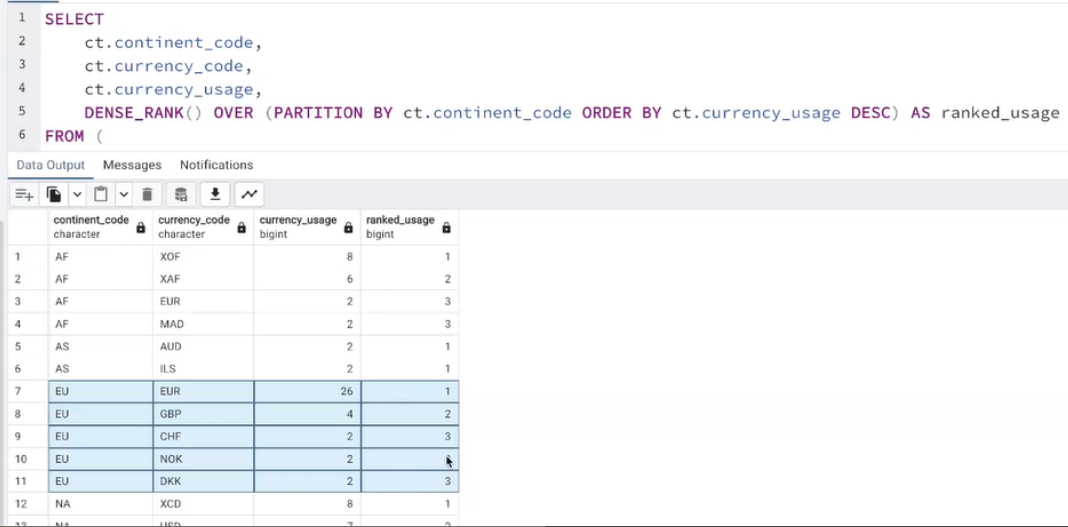
ROW_NUMBER(), RANK(), DENSE_RANK()
1ROW_NUMBER()
Assigns a unique sequential number to each row within a partition (or entire table if no partition).
No ties — each row gets a different number even if values are the same.
Copy code
SELECT
country, population,
ROW_NUMBER() OVER (ORDER BY population DESC) AS row_num
FROM countries;
country population row_num
A 1000000 1
B 800000 2
C 800000 3
D 500000 4
2️RANK()
Assigns a rank based on the ordering of a column.
Tied values get the same rank, but gaps appear after ties.
SELECT
country, population,
RANK() OVER (ORDER BY population DESC) AS rnk
FROM countries;
country population rnk
A 1000000 1
B 800000 2
C 800000 2
D 500000 4
3 DENSE_RANK()
Similar to RANK(), but no gaps after ties.
Tied values get the same rank, next distinct value gets the next consecutive rank.
SELECT
country, population,
DENSE_RANK() OVER (ORDER BY population DESC) AS dense_rnk
FROM countries;
country population dense_rnk
A 1000000 1
B 800000 2
C 800000 2
D 500000 3
ROW_NUMBER → when you need a unique identifier for each row.
RANK → when you want competition-style ranking (like 1st, 2nd, 2nd, 4th).
DENSE_RANK → when you want ranking without skipping numbers (1, 2, 2, 3).
Assigns a unique sequential number to each row within a partition (or entire table if no partition).
No ties — each row gets a different number even if values are the same.
Copy code
SELECT
country, population,
ROW_NUMBER() OVER (ORDER BY population DESC) AS row_num
FROM countries;
country population row_num
A 1000000 1
B 800000 2
C 800000 3
D 500000 4
2️RANK()
Assigns a rank based on the ordering of a column.
Tied values get the same rank, but gaps appear after ties.
SELECT
country, population,
RANK() OVER (ORDER BY population DESC) AS rnk
FROM countries;
country population rnk
A 1000000 1
B 800000 2
C 800000 2
D 500000 4
3 DENSE_RANK()
Similar to RANK(), but no gaps after ties.
Tied values get the same rank, next distinct value gets the next consecutive rank.
SELECT
country, population,
DENSE_RANK() OVER (ORDER BY population DESC) AS dense_rnk
FROM countries;
country population dense_rnk
A 1000000 1
B 800000 2
C 800000 2
D 500000 3
ROW_NUMBER → when you need a unique identifier for each row.
RANK → when you want competition-style ranking (like 1st, 2nd, 2nd, 4th).
DENSE_RANK → when you want ranking without skipping numbers (1, 2, 2, 3).
×
indexes
1 What an Index Is
An index is a database structure that speeds up data retrieval.
Common uses:
WHERE filters
ORDER BY
JOIN conditions
GROUP BY queries
2 Types of Indexes in PostgreSQL
a) B-tree Index (default)
Most commonly used.
Maintains sorted order of the indexed column.
Supports:
=, <, <=, >, >=
ORDER BY optimization
Default for PRIMARY KEY and UNIQUE.
b) Hash Index
Optimized for equality comparisons (=).
Faster than B-tree for equality, but:
Cannot be used for range queries (<, >)
Less commonly used in practice
c) GIN (Generalized Inverted Index)
Optimized for array, JSON, full-text search.
Great for containment queries, e.g., WHERE column @> '{value}'.
d) GiST (Generalized Search Tree)
Flexible, supports geometric data types and full-text search.
Can handle range, nearest neighbor, and other complex queries.
e) BRIN (Block Range Index)
Very small and fast for large, naturally ordered tables.
Stores summary info per block instead of per row.
Good for time-series or sequential data.
3 Clustered Index
PostgreSQL does not automatically cluster tables like SQL Server or MySQL.
A clustered index in PostgreSQL is actually a table physically reordered according to an index.
CLUSTER table_name USING index_name;
Reorders table rows on disk to match the index order.
Makes range queries and sequential scans faster.
Note: PostgreSQL does not maintain clustering automatically.
If you insert new rows later, they may not follow the clustered order.
You need to CLUSTER again manually if desired.
Key: In PostgreSQL, every index is technically separate from the table. Clustered indexes only affect physical storage order, not logical indexing.
An index is a database structure that speeds up data retrieval.
Common uses:
WHERE filters
ORDER BY
JOIN conditions
GROUP BY queries
2 Types of Indexes in PostgreSQL
a) B-tree Index (default)
Most commonly used.
Maintains sorted order of the indexed column.
Supports:
=, <, <=, >, >=
ORDER BY optimization
Default for PRIMARY KEY and UNIQUE.
b) Hash Index
Optimized for equality comparisons (=).
Faster than B-tree for equality, but:
Cannot be used for range queries (<, >)
Less commonly used in practice
c) GIN (Generalized Inverted Index)
Optimized for array, JSON, full-text search.
Great for containment queries, e.g., WHERE column @> '{value}'.
d) GiST (Generalized Search Tree)
Flexible, supports geometric data types and full-text search.
Can handle range, nearest neighbor, and other complex queries.
e) BRIN (Block Range Index)
Very small and fast for large, naturally ordered tables.
Stores summary info per block instead of per row.
Good for time-series or sequential data.
3 Clustered Index
PostgreSQL does not automatically cluster tables like SQL Server or MySQL.
A clustered index in PostgreSQL is actually a table physically reordered according to an index.
CLUSTER table_name USING index_name;
Reorders table rows on disk to match the index order.
Makes range queries and sequential scans faster.
Note: PostgreSQL does not maintain clustering automatically.
If you insert new rows later, they may not follow the clustered order.
You need to CLUSTER again manually if desired.
Key: In PostgreSQL, every index is technically separate from the table. Clustered indexes only affect physical storage order, not logical indexing.
>>
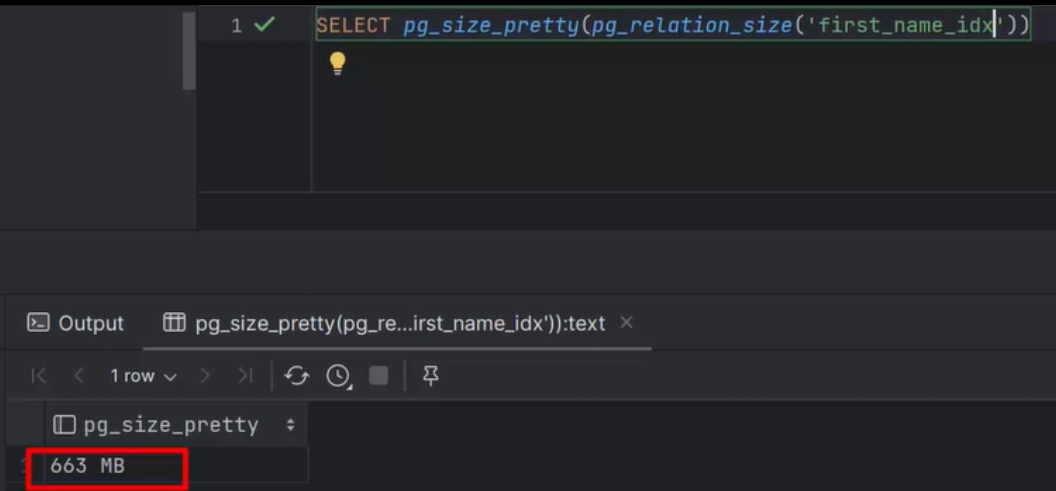
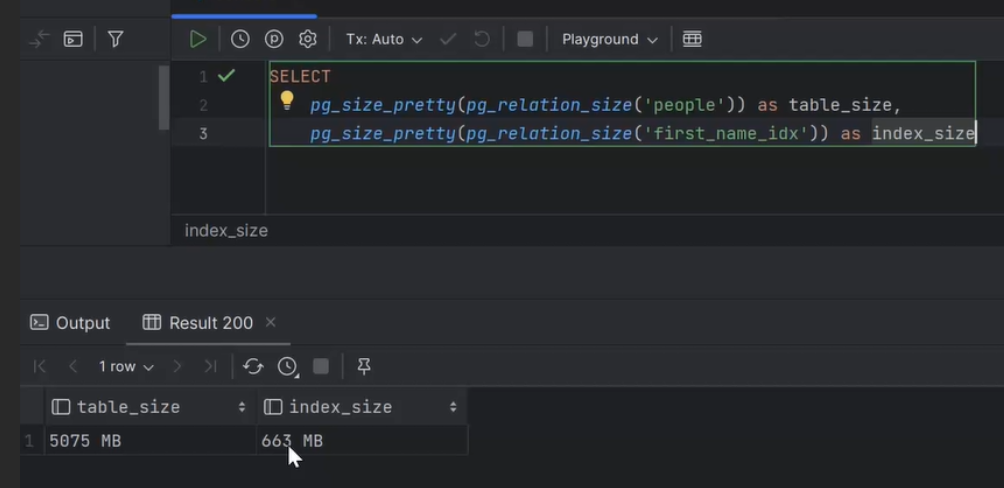
CREATE INDEX first_name_idx ON people (first_name)
Type: B-tree
Single-column: Indexes only first_name.
Column: first_name
Unique: No (unless you add UNIQUE)
Separate structure: The index is stored independently from the table data.
Not clustered: PostgreSQL does not automatically cluster tables. Rows in people are not reordered on disk unless you use CLUSTER.
Purpose: Speeds up equality and range queries (=, <, >, etc.), ORDER BY, JOIN, and GROUP BY operations.
CREATE INDEX first_name_idx ON people (first_name)
Type: B-tree
Single-column: Indexes only first_name.
Column: first_name
Unique: No (unless you add UNIQUE)
Separate structure: The index is stored independently from the table data.
Not clustered: PostgreSQL does not automatically cluster tables. Rows in people are not reordered on disk unless you use CLUSTER.
Purpose: Speeds up equality and range queries (=, <, >, etc.), ORDER BY, JOIN, and GROUP BY operations.
×
functions
>>>
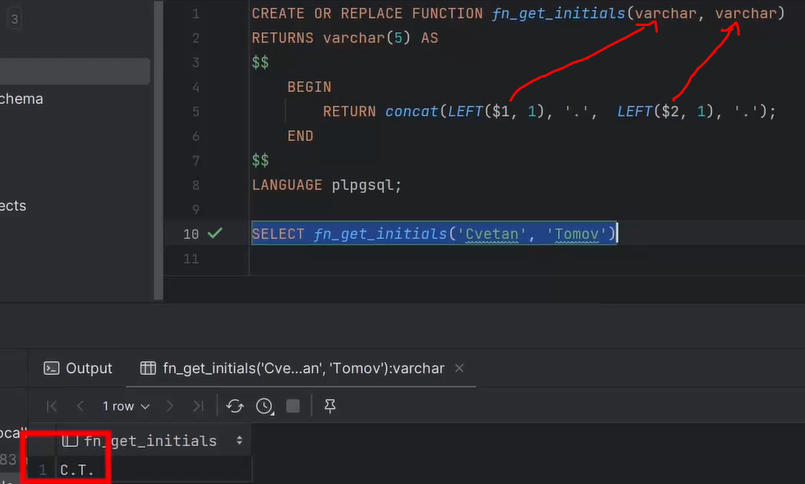
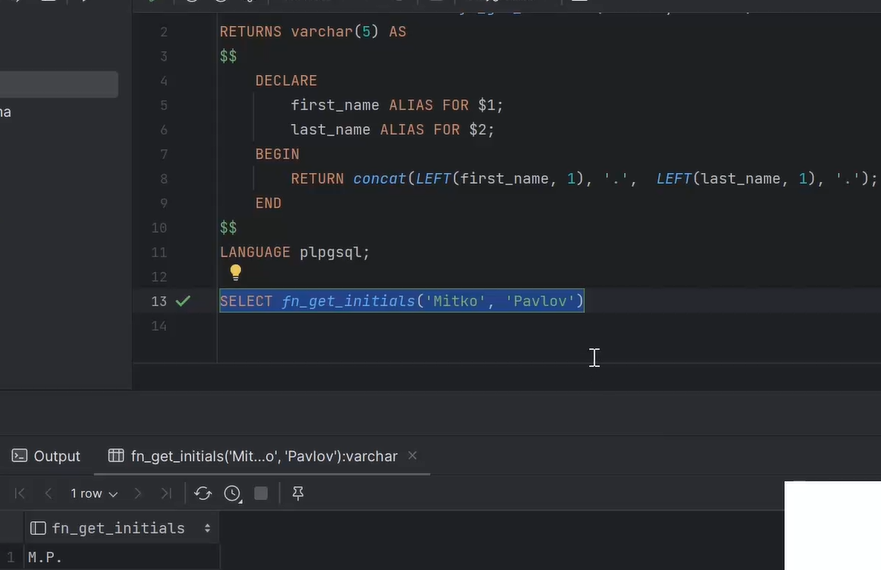
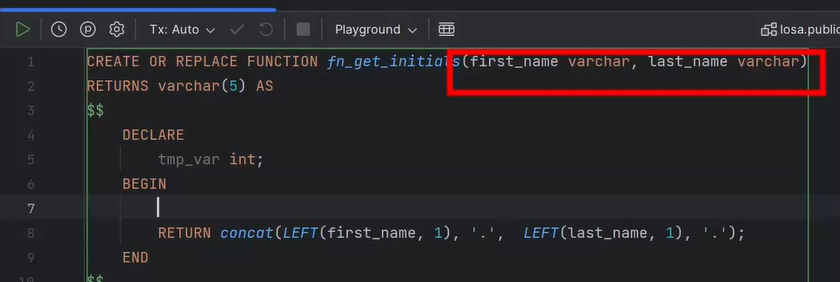
Three Main Types of Functions (by return type)
1. Scalar Function
Returns a single value (one number, text, date, etc.)
LENGTH('hello') → 5
2. Aggregate Function
Returns one value per group of rows
AVG(salary) or SUM(amount)
3. Table-Valued Function (Set-Returning Function)
Returns a set of rows (like a table)
generate_series(1,5) or custom RETURNS TABLE(...)
Three Main Types of Functions (by return type)
1. Scalar Function
Returns a single value (one number, text, date, etc.)
LENGTH('hello') → 5
2. Aggregate Function
Returns one value per group of rows
AVG(salary) or SUM(amount)
3. Table-Valued Function (Set-Returning Function)
Returns a set of rows (like a table)
generate_series(1,5) or custom RETURNS TABLE(...)
>>>
In PostgreSQL, a function declared with RETURNS void means:
It performs some work (like logging, inserting, updating) but doesn’t return any data.
CREATE OR REPLACE FUNCTION log_employee_action(emp_id INT, action TEXT)
RETURNS void
AS $$
BEGIN
INSERT INTO employee_log(employee_id, action, action_time)
VALUES (emp_id, action, NOW());
END;
$$ LANGUAGE plpgsql;
You would call it like this:
SELECT log_employee_action(101, 'Promoted');
or inside a trigger:
PERFORM log_employee_action(OLD.id, 'Deleted');
In PostgreSQL, a function declared with RETURNS void means:
It performs some work (like logging, inserting, updating) but doesn’t return any data.
CREATE OR REPLACE FUNCTION log_employee_action(emp_id INT, action TEXT)
RETURNS void
AS $$
BEGIN
INSERT INTO employee_log(employee_id, action, action_time)
VALUES (emp_id, action, NOW());
END;
$$ LANGUAGE plpgsql;
You would call it like this:
SELECT log_employee_action(101, 'Promoted');
or inside a trigger:
PERFORM log_employee_action(OLD.id, 'Deleted');